
How to measure your waist without a tape measure
Wrap a string, shoelace or charging cable around your waist, level and snug, midway between your lowest rib and the top of your hip bone. Pinch it where the end meets it, lay it straight, and use your iPhone as the ruler: count the phone lengths, then measure the last bit on your iPhone’s screen with the true-size ruler below. Done carefully, it lands within about 1 cm (⅜ in) of a tape.
Interactive guide · about 3 minutes
Measure your waist with a cable and your iPhone
Follow the steps with the cable in your hand. Nothing you enter leaves this page.
-
Find your waist
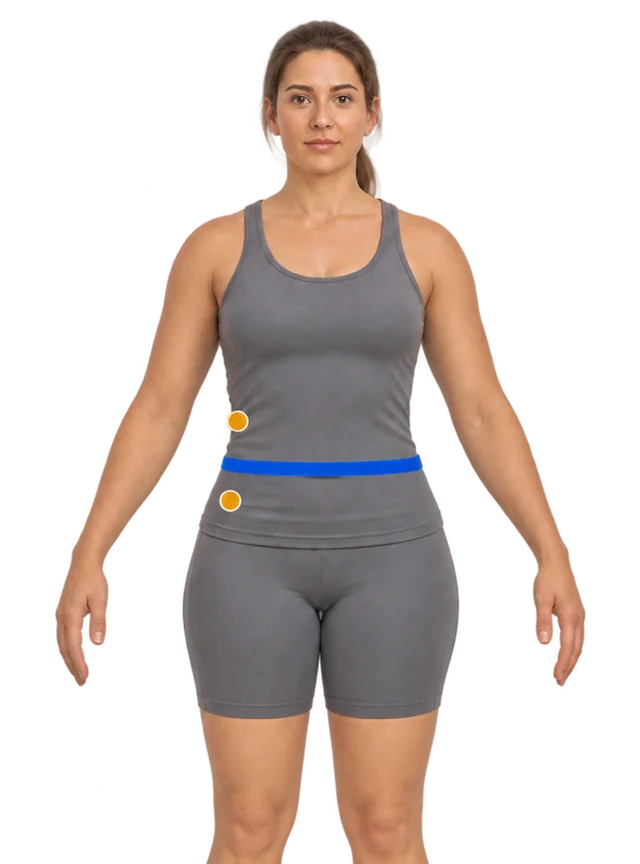 Front
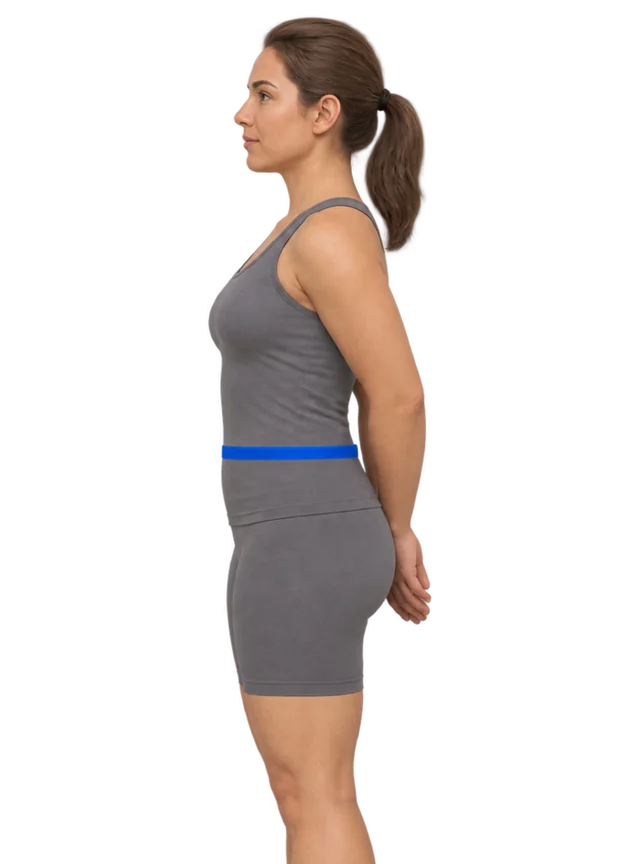 Side
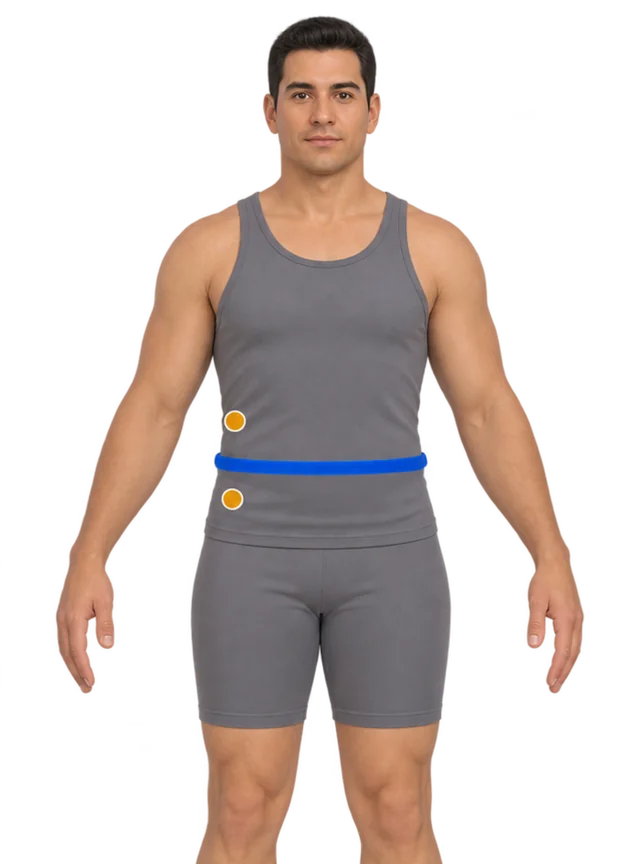 Front
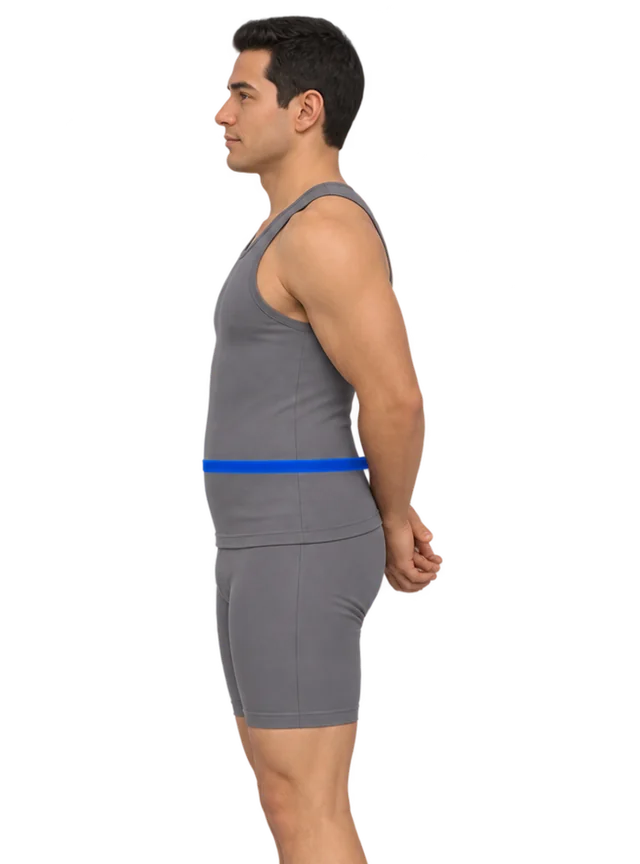 Side
Midway between the lowest rib and the top of the hip bone, level all the way round. Some guides use the belly button instead: pick one and keep to it. 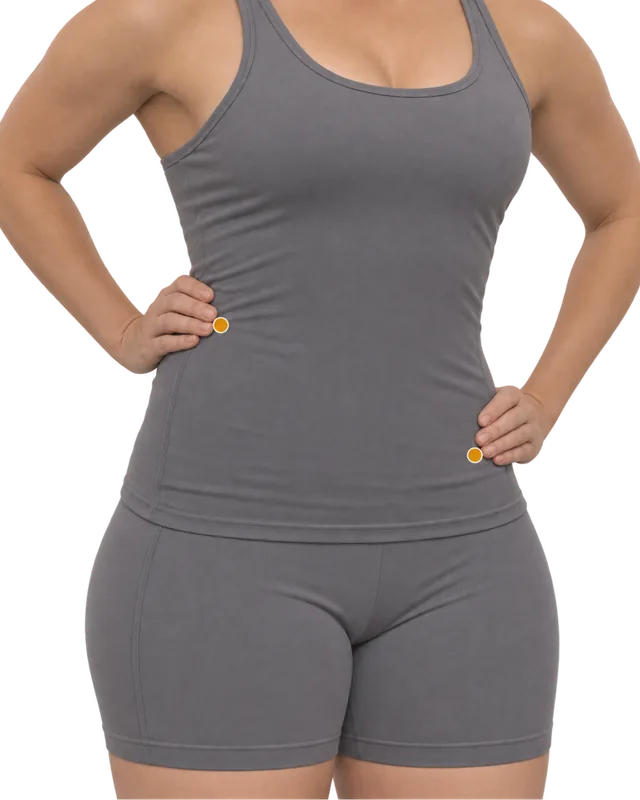
- Press into your side to find the bottom of your lowest rib and the top of your hip bone.
- Your waist is halfway between them, usually at or a little above the belly button.
- Stand relaxed, feet together, arms by your sides. Don’t suck in.
-
Wrap, pinch, lay it straight
- Use something that doesn’t stretch: your charging cable, a shoelace or string. Not yarn or elastic.
- Breathe out normally, then wrap it once around, level with the floor and snug on the skin.
- Pinch where the end meets it, mark that point with a pen or a bit of tape, and lay it straight along a table edge.
Before you pinch, check it in a mirror
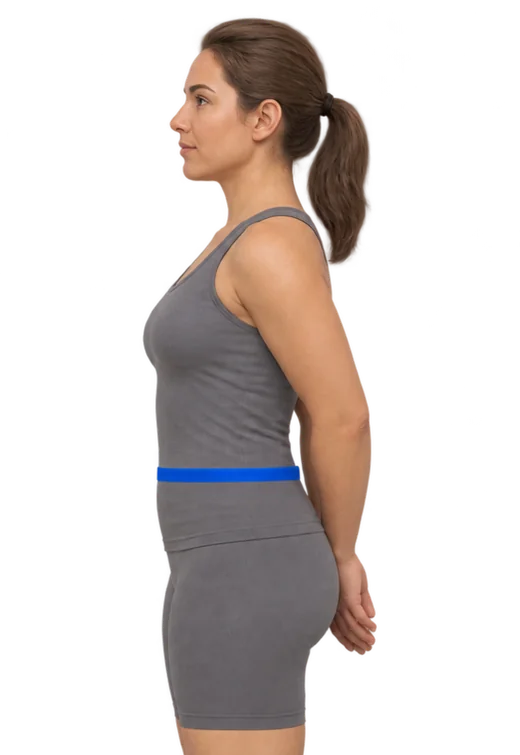
✓ RightLevel and relaxedSame height at your belly and your back. Breathe out normally. 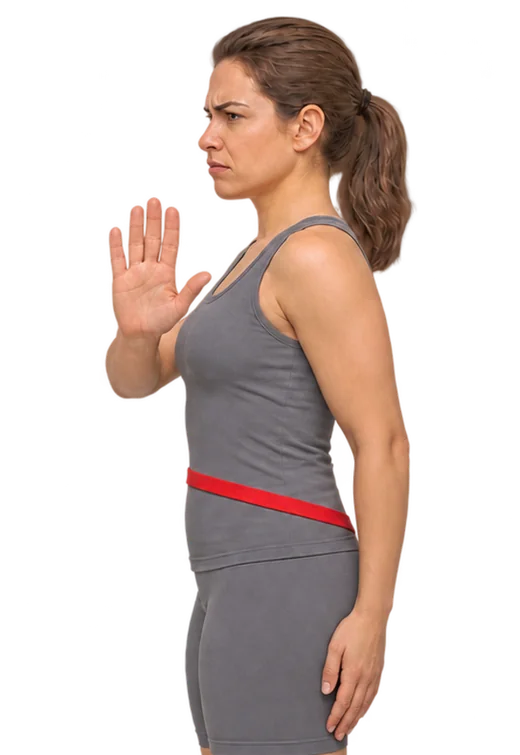
✗ Reads highDips at the backThe usual mistake. Turn sideways to the mirror, or run a hand round to feel it. 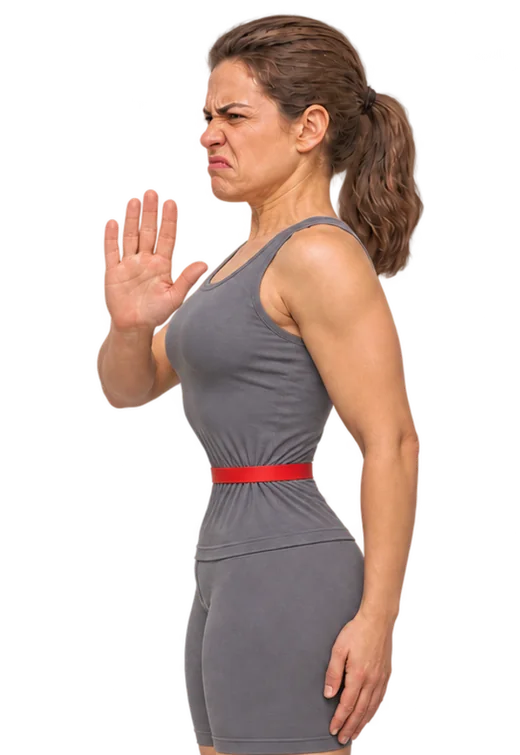
✗ Reads lowSucked in or pulled tightThe cable should just touch your skin, without pressing in. -
What will you use as the ruler?
Looks like you’re on one of these:
Not sure which iPhone? Settings › General › About › Model Name. Take the case off: it adds a few millimetres to every step.
-
Step it along the cable
Put the bottom edge at the end of the cable, mark where the top edge lands, move up to the mark, repeat. Count every full length before your mark.
full lengths -
Measure the last bit
Your iPhone’s screen becomes a true-size ruler. Lay the phone flat, put your mark on the start line, and slide the line to the end of the cable. Accurate to about a millimetre.
Hold the cable against your phone and drag the blue line to where the cable ends.
0 cm past the last full length -
Your waist
Choose your ruler and set the number of lengths you counted to see your number.
0
See it on a 3D body
More measurements App only
What you can measure. All on one body.
- Weight
- Neck
- Chest
- Waist
- Thigh
- Shoulder girth
- Arm
- Wrist
- Hip
- Calf
Left and right · Your own spots
The web version can’t do this
This page can only shape the body from your height, weight and waist. In the Contura app, your hips, chest, thighs, arms and more shape your 3D body too. You can turn it any way you like and put two dates side by side to see exactly what changed.
Download on the App StoreFree for iPhone and iPad. No photos needed.
Add your height and weight to see a body with your measurements. Keep this number, and see what it does next
One measurement tells you where you are. In Contura you save it in two taps, add the rest when you like, and your 3D body updates with every entry, so next month you can see exactly what changed. No photos, no account.
Download on the App Store
What you can measure. All on one body.
- Weight
- Neck
- Chest
- Waist
- Thigh
- Shoulder girth
- Arm
- Wrist
- Hip
- Calf
Left and right · Your own spots
Turn it any way you like, in the app
In Contura this body is yours: drag to turn it, pinch to zoom. Save this waist today, measure again in a week or a month, and see the two bodies side by side, red where you gained and blue where you lost.
Download on the App StoreFree on iPhone. No photos, no account.
Lay a bank or ID card upright on the dashed outline, top edge on the blue line. Its sides should sit on the dashed lines. If not:
How long is my iPhone?
To find your model, open Settings › General › About and look at Model Name. Many models share a length.
Length and width of every iPhone, iPhone 11 to iPhone 18
| Length | Width | Models |
|---|---|---|
| 11.78 cm 4.64 in | 8.41 cm 3.31 in | iPhone Duo (folded) |
| 13.15 cm 5.18 in | 6.42 cm 2.53 in | iPhone 13 mini, iPhone 12 mini |
| 13.84 cm 5.45 in | 6.73 cm 2.65 in | iPhone SE (3rd generation), iPhone SE (2nd generation) |
| 14.4 cm 5.67 in | 7.14 cm 2.81 in | iPhone 11 Pro |
| 14.66 cm 5.77 in | 7.06 cm 2.78 in | iPhone 15 Pro |
| 14.67 cm 5.78 in | 7.15 cm 2.81 in | iPhone 17e, iPhone 16e, iPhone 14, iPhone 13 Pro, iPhone 13, iPhone 12 Pro, iPhone 12 |
| 14.75 cm 5.81 in | 7.15 cm 2.81 in | iPhone 14 Pro |
| 14.76 cm 5.81 in | 7.16 cm 2.82 in | iPhone 16, iPhone 15 |
| 14.96 cm 5.89 in | 7.15 cm 2.81 in | iPhone 17, iPhone 16 Pro |
| 15.0 cm 5.91 in | 7.19 cm 2.83 in | iPhone 18 Pro, iPhone 17 Pro |
| 15.09 cm 5.94 in | 7.57 cm 2.98 in | iPhone 11 |
| 15.62 cm 6.15 in | 7.47 cm 2.94 in | iPhone Air |
| 15.8 cm 6.22 in | 7.78 cm 3.06 in | iPhone 11 Pro Max |
| 15.99 cm 6.30 in | 7.67 cm 3.02 in | iPhone 15 Pro Max |
| 16.07 cm 6.33 in | 7.76 cm 3.06 in | iPhone 14 Pro Max |
| 16.08 cm 6.33 in | 7.81 cm 3.07 in | iPhone 14 Plus, iPhone 13 Pro Max, iPhone 12 Pro Max |
| 16.09 cm 6.33 in | 7.78 cm 3.06 in | iPhone 16 Plus, iPhone 15 Plus |
| 16.3 cm 6.42 in | 7.76 cm 3.06 in | iPhone 16 Pro Max |
| 16.34 cm 6.43 in | 7.8 cm 3.07 in | iPhone 18 Pro Max, iPhone 17 Pro Max |
Sizes are from Apple’s tech specs for each model, without a case. iPhone Duo is listed folded.
No iPhone to hand? Other things with a known size
| Object | Long side | Short side |
|---|---|---|
| Bank card, ID card or transit card (ISO/IEC 7810 ID-1, the same size worldwide) | 8.56 cm · 3.37 in | 5.40 cm · 2.13 in |
| A4 paper | 29.7 cm · 11.69 in | 21.0 cm · 8.27 in |
| US Letter paper | 27.94 cm · 11 in | 21.59 cm · 8.5 in |
| US banknote, any denomination | 15.60 cm · 6.14 in | 6.63 cm · 2.61 in |
A card is small, so you will step it ten or more times and the small errors add up. A sheet of paper is quicker: most waists are two to three A4 or Letter lengths. All of these are in the calculator too.
Or let the Measure app read the string
Every iPhone has Apple’s Measure app, in the Utilities folder. Lay the string straight on a table, point the camera at it, tap + at one end, move to the other end and tap + again. Apple describes the result as approximate and recommends measuring from 0.5 to 3 metres away. It is quick for a first number; for a number you will compare against next month, stepping the phone along the string is steadier. More on this in Can I measure my waist with my iPhone?
Two more things that change the number
Where the cable sits and how tight it is are covered in step 2 above. Two more:
A case adds a few millimetres to every length, and they add up.
Meals and bloating move your waist. Morning, before breakfast, is the most repeatable.
Measuring to track change
If you want to see whether your waist is going down, the exact number matters less than measuring the same way every time: the same spot, the same string, the same time of day. A change of half a centimetre between two days is noise; a steady move over three or four weeks is real. For the other measurements worth taking, see how to measure body circumference.
Questions people ask
How do I measure my waist without a tape measure or a ruler?
Wrap a piece of string, a shoelace or your phone’s charging cable around your waist, pinch it where the end meets it, and lay it straight. Then count how many times your iPhone fits along it, end to end, and turn that into centimetres or inches with the phone’s length. An iPhone 16 is 14.76 cm (5.81 in) long, for example. No ruler needed.
Can I measure my waist with my hands?
Only roughly. Hand spans differ a lot from person to person, so you would first have to measure your own span against something of known size, such as your phone, and a spread hand never opens to exactly the same width twice. A string read against your phone is more accurate.
Is this accurate enough for jeans or a dress size?
Yes. Done carefully, a string measured with a phone lands within about a centimetre (under half an inch) of a tape. Size charts usually step by several centimetres. For jeans, measure where the waistband will sit rather than at your natural waist.
Do men and women measure the waist in the same place?
For health, yes: guidelines such as NICE place the tape midway between the lowest rib and the top of the hip bone for everyone. For clothing it differs. Women’s size charts usually use the natural waist, the narrowest part of the torso. Men’s trouser sizes use where the trousers sit, which is often lower, around the hip bones.
Should I measure over clothes?
Measure on bare skin or over one thin layer. A jumper or a waistband can add a few centimetres. If you measure over clothing once, measure over the same kind of clothing every time so your numbers stay comparable.
What is a healthy waist size?
NICE in the UK suggests keeping your waist to less than half your height, so a waist-to-height ratio under 0.5. In the US, the NHLBI says risk goes up above 40 inches (102 cm) for men and 35 inches (88 cm) for women who are not pregnant. The guide above shows your ratio when you add your height in the last step.
Your body in 3D
Your new number, on a body
The numbers from the guide above are filled in. This is the closest body from Contura’s 3D model with your waist, height and weight. Tap it to turn it around.
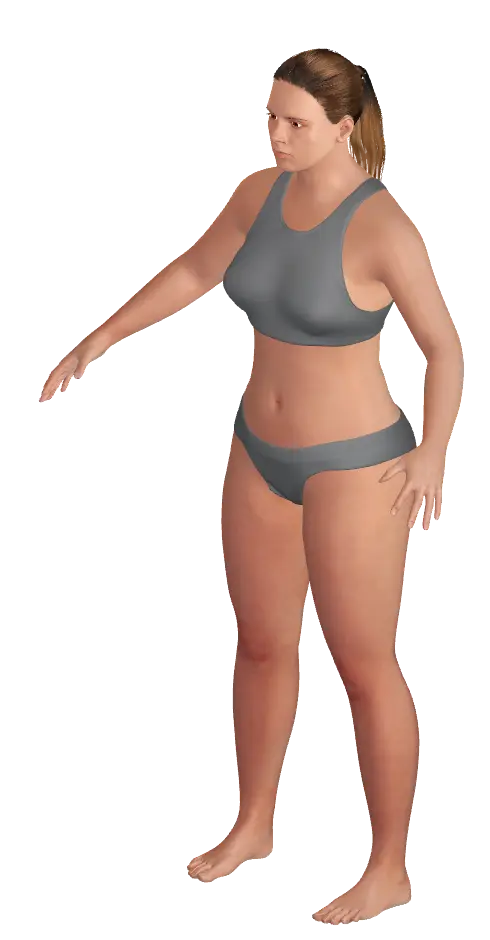
This preview is an estimate from a parametric 3D body model. It is not a body scan or a medical assessment.
What you can measure. All on one body.
- Weight
- Neck
- Chest
- Waist
- Thigh
- Shoulder girth
- Arm
- Wrist
- Hip
- Calf
Left and right · Your own spots
Turn it around in the app
In Contura this body turns any way you like. Log your measurements each week and it changes with you, so you can put any two dates side by side.
Download ConturaSources
- iPhone Tech Specs (one page per model, Size and Weight section) Apple Support, iPhone 11 to iPhone 18 Pro Max and iPhone Duo (checked 16 November 2026)
- Measure dimensions with iPhone iPhone User Guide, Apple Support (iOS 27; checked 16 November 2026)
- ISO/IEC 7810:2019 Identification cards — Physical characteristics ISO/IEC, edition 4, 2019; confirmed 2025. ID-1 size used by payment and ID cards
- The $10 note, 1914–1990: “The size of the note is reduced to 6.14 x 2.61 inches” (1929) U.S. Currency Education Program (Federal Reserve), uscurrency.gov; current notes of every denomination share this size
- NICE guideline NG246: Overweight and obesity management, section 1.9 National Institute for Health and Care Excellence, published 14 January 2025, last updated 8 January 2026
- Heart-Healthy Living: Aim for a Healthy Weight (Measuring waist circumference) National Heart, Lung, and Blood Institute (NIH), last updated 11 December 2025